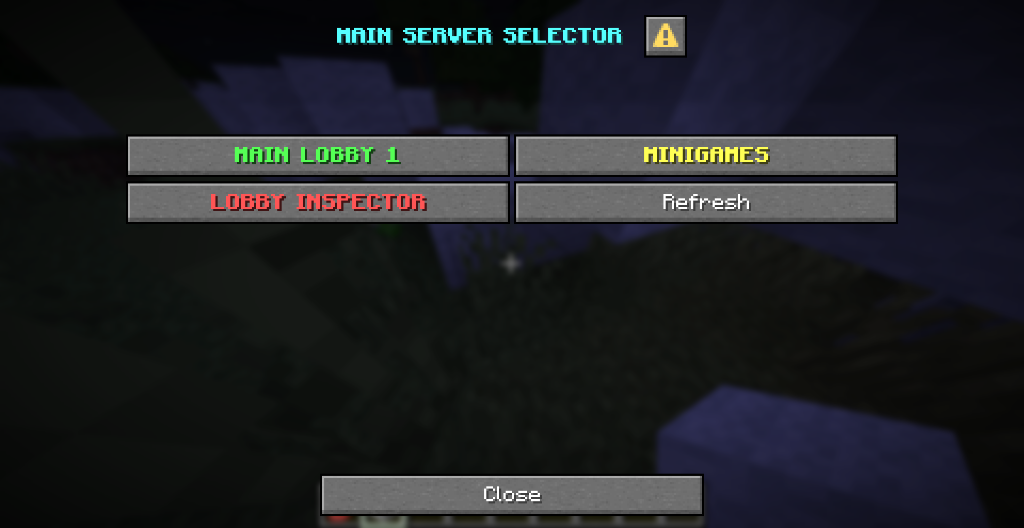
Starting with VelocityNavigator 4.6.0, Java players can use Minecraft's native dialogs for the lobby selector, party management, authentication, and backend YAML menus, including menus opened by NPCs. New configurations use auto: dialogs on supported clients and backends, with the existing interfaces as fallbacks.
Install the same updated JAR on the Velocity proxy and each backend that opens these interfaces. Native dialogs require a Java client running Minecraft 1.21.6 or newer and a backend exposing Paper's dialog API, introduced in Paper 1.21.7. Compatible Paper derivatives can expose the same API. A modern client connected to an older backend still uses the fallback.
| Situation | Lobby selector | Party menu | Authentication |
|---|---|---|---|
| Supported Java client and Paper dialog API | Native dialog | Native dialog | Login or registration dialog |
| Older Java client or backend without dialog API | Chest inventory | Chest inventory | Existing sign prompt and command instructions |
| Backend bridge unavailable | Chat, when enabled | Chat | Command instructions |
| Floodgate Bedrock player | Existing Bedrock form | Existing Bedrock form | Existing Bedrock form |
ViaVersion's original client protocol is used when available. Otherwise the proxy sends its observed client protocol to the backend. Unknown client versions use the fallback. The Velocity dialog API is not required; the backend creates the dialogs.
For /lobby menu, edit the proxy's plugins/velocitynavigator/navigator.toml:
[routing.java_menu]
type = "auto"
fallback_to_chat = true
auto and dialog prefer native dialogs and fall back to inventories. inventory or chest always chooses the chest interface. chat chooses the clickable chat selector. Existing explicit choices survive configuration migration.
For parties and authentication, edit the proxy's plugins/velocitynavigator/gui.toml:
[java_ui]
party = "auto"
authentication = "auto"
Party choices are auto, dialog, inventory (also chest), and chat. Authentication choices are auto, dialog, sign, and command. command suppresses the sign and dialog prompts. Authentication remains disabled until enabled in auth.toml.
For backend YAML menus, edit plugins/VelocityNavigator/config.yml on that backend:
java_ui: autoUse auto, dialog, or inventory (also chest). An individual menus/*.yml file can override this:
title: "&bNetwork menu"
rows: 3
ui: inventory
items:
  lobby:
    slot: 13
    target: "lobby-1"
    material: "COMPASS"
    name: "&aMain lobby"
    lore: ["&7Return to the hub"]
The per-menu default is ui: inherit. An NPC using menu:<name> opens that menu with the same setting. Direct NPC transfers and commands keep their existing behavior.
Reload proxy settings with /vn reload. Reload backend menus and the backend java_ui setting with /vnavmenu reload.
Lobby and YAML dialogs show up to 18 entries per page, with previous, next, and refresh buttons. Lobby names, descriptions, state labels, and hover text reuse the existing menu templates. Unavailable entries appear as information without an action. Dialogs have no item slots or material icons; chest layout settings apply to the inventory fallback. YAML entries follow slot order.
Dialog refresh is manual. The inventory refresh timer does not reopen a dialog after the player closes it. Party dialogs paginate members and send the same party commands used elsewhere, including their current permission and role checks.
The new labels use menus.dialog.*, party.dialog.*, and auth.dialog.* in the active language bundle. Bundled languages use English defaults for labels without a translation. Customize them through messages.toml or a language properties file.
Login dialogs have one password field; registration dialogs also ask the player to repeat the password. /login and /register without arguments reopen the appropriate prompt. Commands with password arguments remain available, and command instructions appear in chat even when a prompt is open.
Minecraft's dialog text fields do not mask passwords. The dialog explicitly warns that the text is visible on screen. Submissions travel through private backend plugin messages rather than public chat, and use the existing authentication validation, hashing, rate limits, and account lockouts. Closing a dialog does not authenticate the player or remove holding-server restrictions.
The older sign prompt still depends on a real server-side sign at its chosen location. Commands remain available when that prompt cannot open. Set authentication = "command" to use command instructions exclusively.
Actions are tied to the player, opening backend, allowed action list, and an expiring single-use token. Replacing a prompt or changing backend invalidates its callbacks. Repeated auth prompts do not extend the authentication deadline.
Test a supported Java client, an older Java client, and a Floodgate player on your network. Check lobby pagination, party permissions, YAML submenus and NPC entry points, login failures, registration, dialog dismissal, and server switches. The automated suite covers protocol validation, session binding and expiry, configuration migration, and menu presentation; a Paper runtime probe checks dialog construction without a connected Minecraft client.