

Reasoning-based RAG ◦ No Vector DB, No Chunking ◦ Context-Aware Retrieval ◦ Reads Like a Human
🌐 Website • ☁️ Cloud • 📖 Docs • 📝 Blog • ✉️ Contact
- [Aug '26] 🔥 PageIndex SDK:
pip install -U pageindexnow ships local mode: index, retrieve, and chat entirely on your machine with your own LLM key, or point the same client at PageIndex Cloud with an API key. - [Aug '26] ⚡ PageIndex Flash: fast tree index generation for text-based PDFs, now the default indexing method in PageIndex SDK local mode.
- Scale PageIndex to Millions of Documents: PageIndex File System is a file-level tree indexing layer that lets PageIndex reason over an entire corpus, not just a single document.
- PageIndex App: a human-like document analysis agent for long professional documents.
Are you frustrated with vector database retrieval accuracy for long and complex documents? Vector-based RAG retrieves by semantic similarity. But similarity ≠ relevance — what retrieval actually needs is relevance, and relevance requires reasoning. On professional documents that demand contextual understanding, domain expertise, and multi-step reasoning, similarity search misses what is relevant but not similar, and returns what is similar but not relevant.
Inspired by AlphaGo, PageIndex replaces the vector index with a hierarchical tree index and lets an LLM reason its way through it, the way a human expert turns to and reads the right section of a long report. Retrieval happens in two steps:
- Index: generate a tree-structure index for each document
- Retrieve: agentically search that tree with LLM reasoning
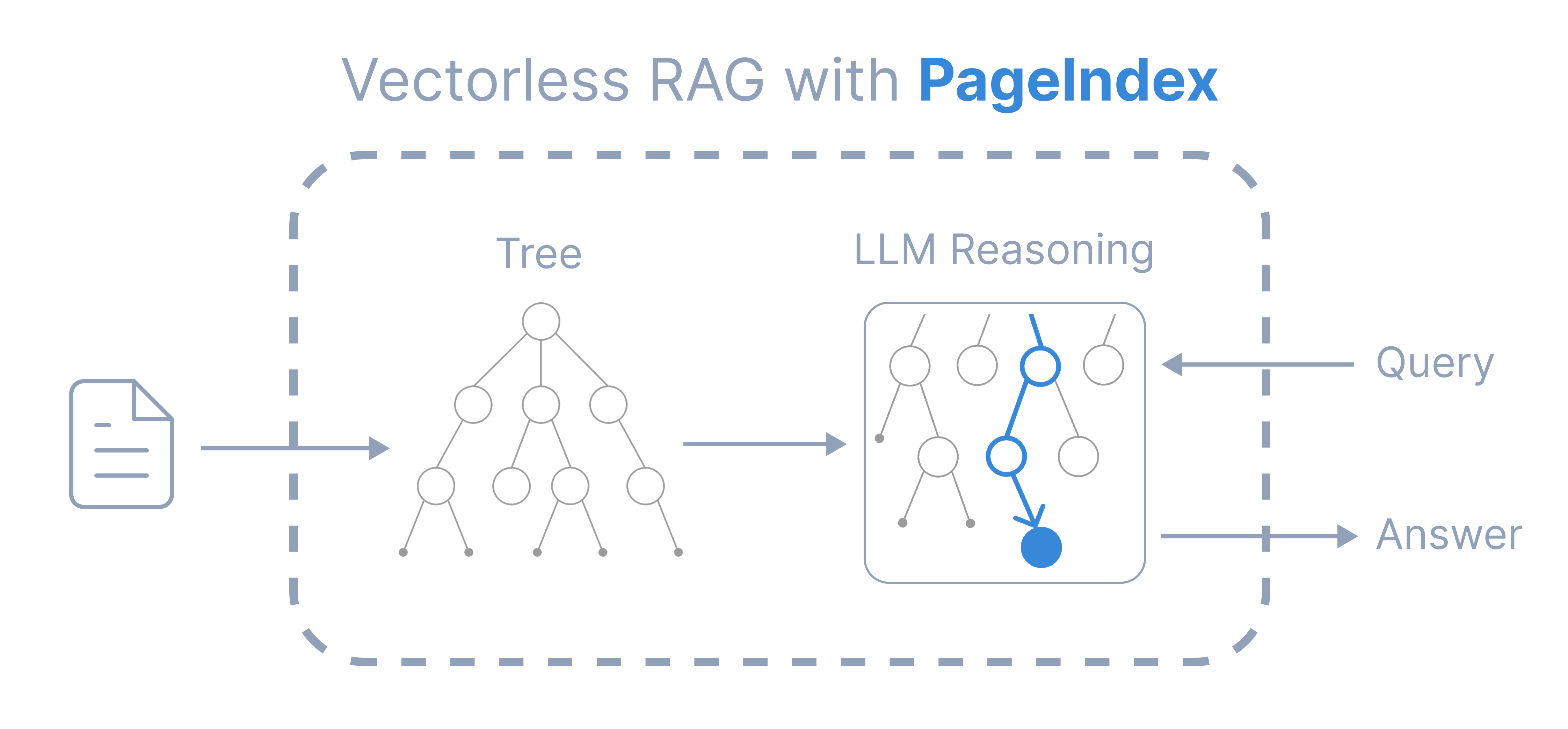
PageIndex is a vectorless, reasoning-based RAG engine that mirrors how humans read, delivering traceable, explainable, and context-aware retrieval, with no vector DBs or chunking.
| Vector RAG | PageIndex | |
|---|---|---|
| Index | vector index | tree index |
| Retrieval | semantic similarity search | LLM reasoning over the tree |
| Result | opaque, “vibe retrieval” | traceable to explicit references |
| Context | query embedding only | full context: conversation history, domain knowledge, etc. |
It is ideal for financial reports, legal documents, regulatory filings, technical manuals, medical literature, academic textbooks, and any other long, complex professional document.
pip install -U pageindeximport os
from pageindex import PageIndexClient
os.environ["OPENAI_API_KEY"] = "your-openai-key"
client = PageIndexClient(
index="gpt-5.6-luna", # model to build the tree index
chat="gpt-5.6-sol", # model to search the tree
)
doc_id = client.submit_document("report.pdf")["doc_id"]
answer = client.chat("What was the 2023 operating margin?", doc_id=doc_id)
print(answer)index=: a basic model is sufficient. The tree structure itself is extracted from the document layout without an LLM; the index model only summarizes and refines it, which a basic model does well.chat=: use the best model you can afford. The chat model searches the tree to retrieve information. See Query cost and accuracy.
Configure other models, streaming, multi-document search, citations, and more.
Drop PageIndex tools into the OpenAI Agents SDK, the Claude Agent SDK, or any other framework.
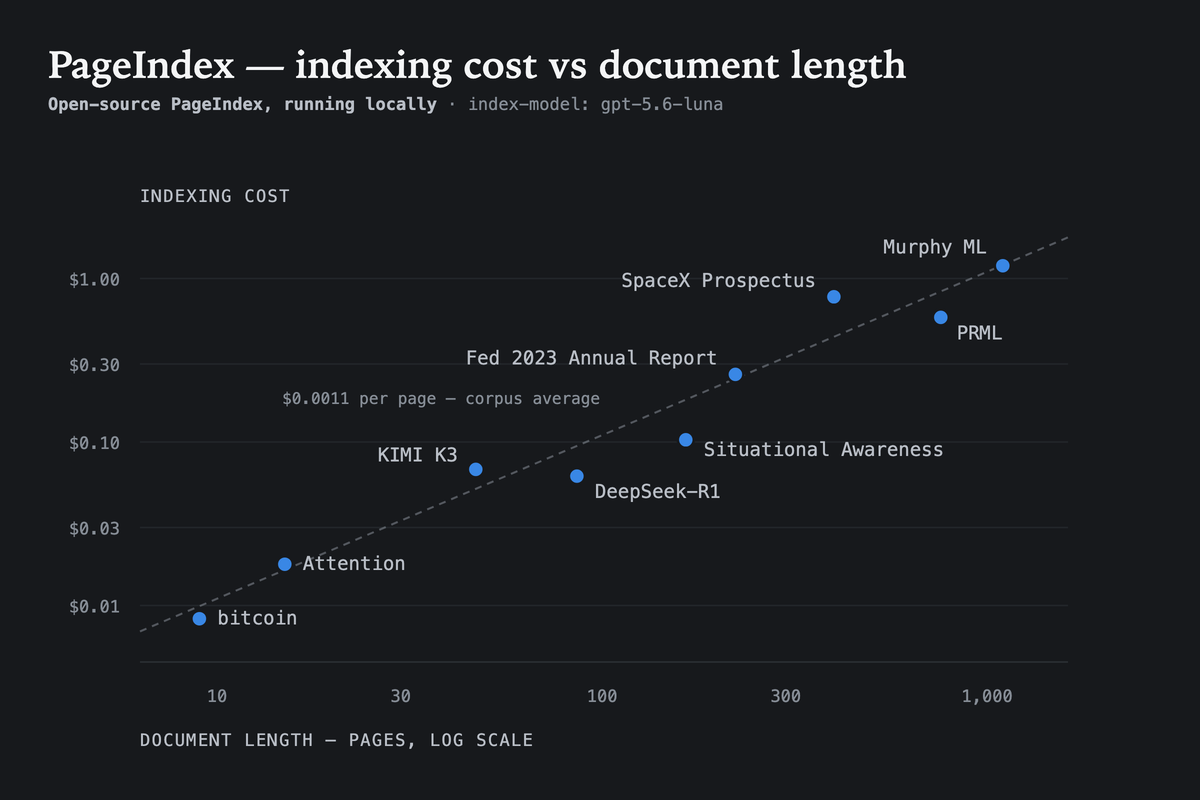
Building a tree locally runs about $0.001 per page with gpt-5.6-luna as the index model, so a 1,000-page textbook costs a little over a dollar and a few minutes, once, and every later question reuses it. PageIndex is designed not to rely heavily on the model used at index time, so in our experiments a basic model does not hurt quality.
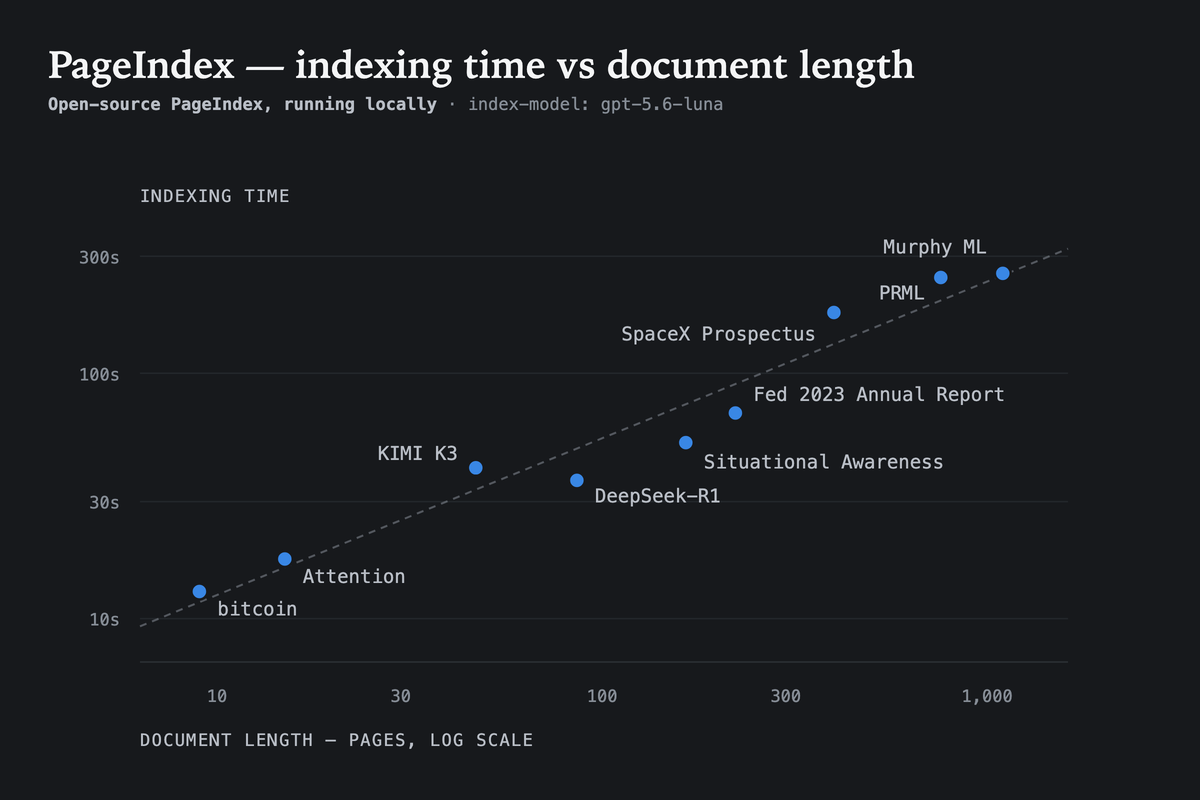
Indexing time also scales predictably with document length. In the same local setup, the benchmark documents (9 to 1,098 pages) finished in roughly 13 seconds to 4.5 minutes.
PageIndex-OSS-Benchmark measures exactly the setup in the quickstart above (PageIndexClient() in local mode, flash indexing, no OCR) on 62 lookup questions over 34 PDFs (1,945 pages) drawn from MMLongBench-Doc-V2. Every question's answer is a fact stated in running text, so a wrong answer is a retrieval or reading failure, not a reasoning one.
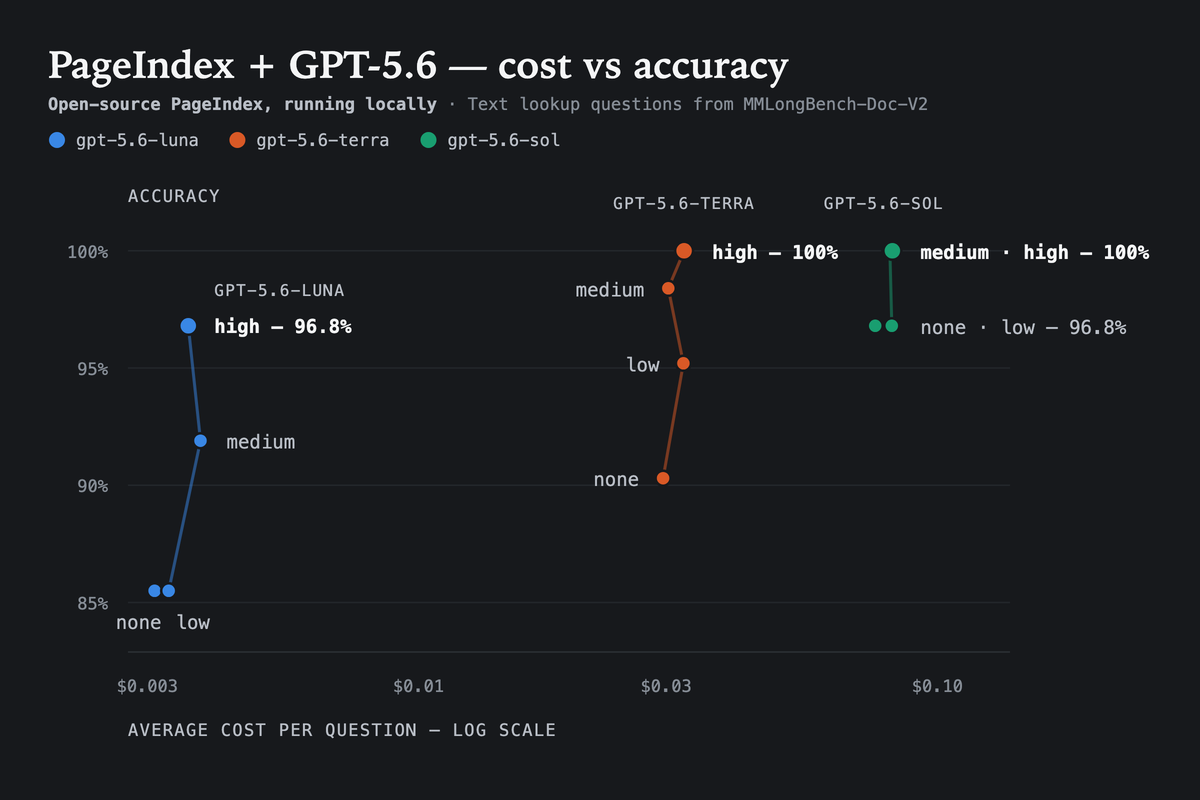
Full results, data, and the runner are in the benchmark repo.
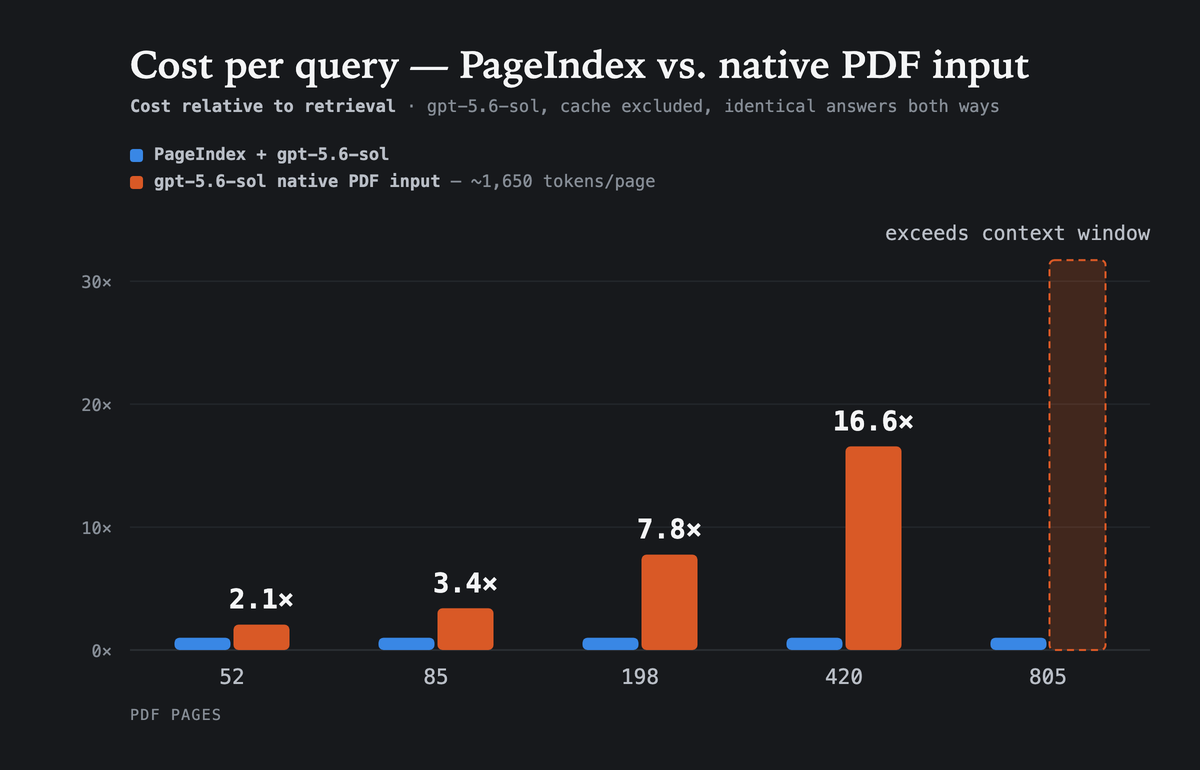
The alternative to retrieval is handing the model the whole PDF on every question. That cost grows with the document; PageIndex's does not, because it reads only the nodes its reasoning reaches. On documents where both routes return the same answer, native PDF input costs 2.1× more at 52 pages and 16.6× more at 420 (gpt-5.6-sol, prompt caching excluded) — and at 805 pages the document no longer fits in the context window at all.
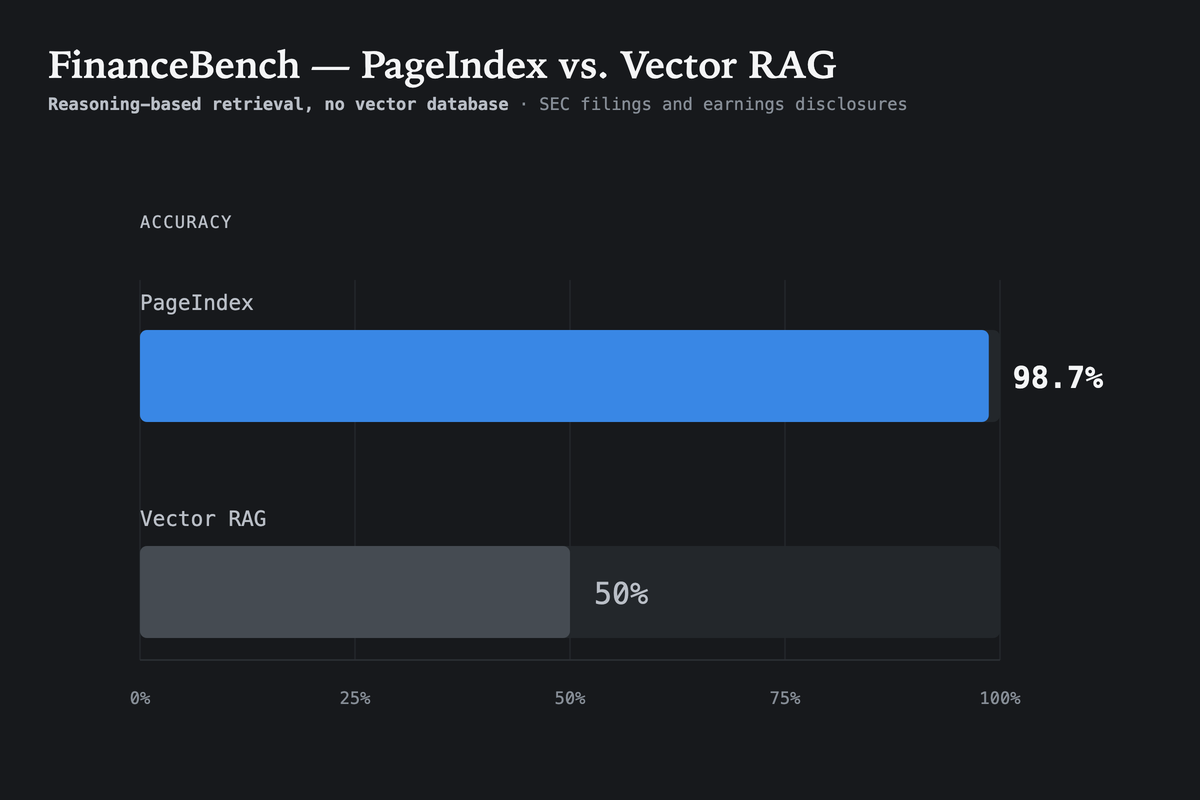
PageIndex reached a state-of-the-art 98.7% accuracy on FinanceBench (financial document QA benchmark), vastly outperforming vector-based RAG.
Explore the full FinanceBench evaluation results and the blog post.
The open-source version is ideal for text-heavy PDFs and local workflows. With PageIndex Cloud, document indexing and storage run in the cloud: PageIndex handles parsing, OCR, image understanding, tree-index construction, and managed storage for you. The chat and retrieval layer remains compatible with your model, so you can search the cloud-hosted index using the model provider your application already uses.
Moving indexing and storage from Local to Cloud only requires a PageIndex API key:
import os
from pageindex import PageIndexClient

os.environ["PAGEINDEX_API_KEY"] = "your-pageindex-key"
os.environ["OPENAI_API_KEY"] = "your-openai-key"

client = PageIndexClient(
    index="cloud",                       # build and store the index in PageIndex Cloud
    chat="gpt-5.6-sol",                  # use your preferred compatible model for chat
)
doc_id = client.submit_document("report.pdf", wait=True)["doc_id"]
print(client.chat("What was the 2023 operating margin?", doc_id=doc_id))| Local | Cloud | |
|---|---|---|
| Handles | Text-based PDFs | Text-based, scanned, and image-rich documents |
| Indexing | On your machine | Managed by PageIndex |
| Storage | Local directory | Cloud storage |
| Citations | Page-level | Block-level |
| OCR & image understanding | — | ✓ |
| Metadata | — | ✓ |
| Folders | — | ✓ |
| MCP server | — | ✓ |
- Scale PageIndex to Millions of Documents: PageIndex File System is a Cloud-only, file-level tree indexing layer that lets PageIndex reason over an entire corpus, not just a single document.
- Get a PageIndex API key
- Read the PageIndex Cloud documentation
For dedicated deployment (VPC or on-premises), contact us or book a demo.
Leave us a star 🌟 if you like our project. Thank you!

Please cite this work as:
Mingtian Zhang, Yu Tang and PageIndex Team,
"PageIndex: Next-Generation Vectorless, Reasoning-based RAG",
PageIndex Blog, Sep 2025.
Or use the BibTeX citation.
@article{zhang2025pageindex,
  author = {Mingtian Zhang and Yu Tang and PageIndex Team},
  title = {PageIndex: Next-Generation Vectorless, Reasoning-based RAG},
  journal = {PageIndex Blog},
  year = {2025},
  month = {September},
  note = {https://pageindex.ai/blog/pageindex-intro},
}
© 2026 PageIndex AI
