
This is a CLI tool that I use to parse the git history of a repo.
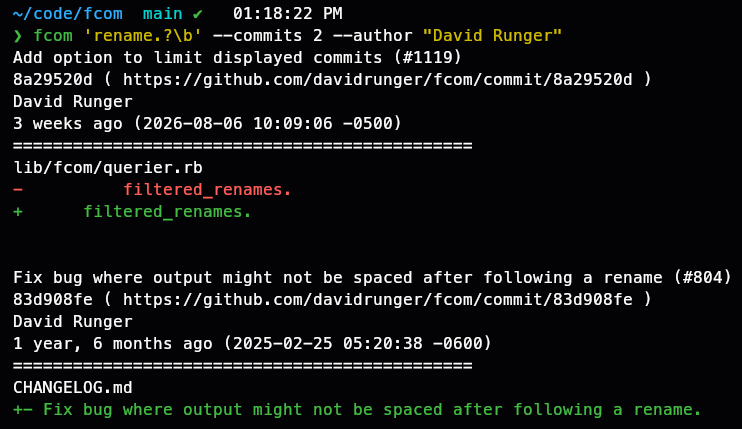
For example, if I use fcom to search this repo with fcom 'rename.?\b' --commits 2 --author "David Runger", I get this output:
- Table of Contents
- Installation
- Dependencies
- Basic usage
- The .fcom.yml config file
- Performance considerations for -p/--path option
- Development
- Contributing
- License
gem install fcom
This gem assumes that you have git and rg (ripgrep) installed.
$ fcom <search string> [options]
After installing, execute fcom --help to see usage examples and available options.
$ fcom --help

Usage: fcom <search string> [options]

Examples:
  fcom update
  fcom 'user.update!' --fixed-strings
  fcom "def update" --days 60
  fcom "[Uu]ser.*slug" -d 365
  fcom options --path spec/
  fcom "line.(green|red)" -d 365 --repo davidrunger/fcom -a "David Runger"

    --repo               GitHub repo (in form `username/repo`)
    -d, --days           number of days to search back
    -c, --commits        maximum number of commits to show
    -F, --fixed-strings  interpret search string as a fixed string
    -i, --ignore-case    search case-insensitively
    -p, --path           path (directory or file) used to filter results
    -a, --author         author
    --rg-options         additional options passed directly to `rg` (e.g. `--rg-options "--max-columns 1000"`)
    --debug              print debugging info
    --init               create an `.fcom.yml` config file
    -v, --version        print the version
    -h, --help           print this help information
We highly recommend that you create an .fcom.yml file in any repository that you plan to search
with fcom.
This file can be created automatically by executing fcom --init in the relevant
repo/directory.
(You might (or might not) want to add .fcom.yml to your ~/.gitignore_global file, so that this
file is not tracked by git.)
repo: githubusername/reponameThe advantage of creating an .fcom.yml config file is that it will make the fcom command execute
more quickly, because time will not be wasted parsing the output of git remote [...] in order to
determine the URL of the repo's remote repository (which is used to construct links to matching
commits).
The performance of fcom's querying and parsing of git history can significantly depend upon the -p/--path option provided (or lack thereof):
- fastest: provide a file path as the
-p/--pathoption - medium: do not provide any
-p/--pathoption (i.e. search the whole repository) - slowest: provide a subdirectory
-p/--pathoption
After checking out the repo, run bin/setup to install dependencies. Then, run bundle exec rake spec to run the tests. To run a search using the local executable, use bundle exec ruby exe/fcom, for example bundle exec ruby exe/fcom 'rename.?\b' --commits 2. You can also run bin/console for an interactive prompt that will allow you to experiment.
To install this gem onto your local machine, run (in this repository's root directory):
$ rm -f pkg/*.gem && rake build && gem install --local pkg/fcom-*.gem
Bug reports and pull requests are welcome on GitHub at https://github.com/davidrunger/fcom.
The gem is available as open source under the terms of the MIT License.