Repository navigation
Remove environment warning #59
Description

Hi, first of all - great plugin!
I've set it up and everything works great, but when I run gulp I get the warning "basicScroll is not executing because you are using it in an environment without a window object".
I'm a bit of a rookie so this could be something I have done. I've searched the error and similar errors on Google but couldn't find a fix. Any ideas?
Activity
[-]Warning: environment without a `window` object[/-][+]Remove environment warning[/+]electerious commentedon Sep 11, 2020
That's fine. It's because you're building or using your modules in an environment without a
windowobject. You can ignore it if your site is working fine 😊We should remove this error as it's just annoying when using SSR.
guyhamilton commentedon Sep 13, 2020
@electerious Ok cheers - thanks for your response!
juriadams commentedon Sep 15, 2020
What's if the site isn't working fine? 😞
This might be a problem related to the
react-basic-scrollpackage, but when trying to use a variable, it's initially set toNaNand when scrolling just 1px, it sets itself to thetovalue. I'm pretty sure this is related to this warning message.Here's my config:
And here's my implementation of the
ReactBasicScrollWrapper-Component:When initially opening the Page, the variable is set to
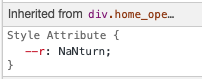
NaNturn:... and after scrolling 1px, it sets itself to
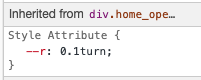
0.1turn, thetovalue:Do you want me to open a new Issue? I'm not sure since I suspect that this relates to this issue. :)
electerious commentedon Sep 18, 2020
It's not related to this issue, but it might be worth to try
from: 0instead offrom: "0". Not sure if that helps. It might also be because of thefromandtovalues. You're currently starting your animation when the bottom of the element reaches the bottom of the viewport, and ending when the top of the element reaches the top of the viewport. This should be fine, but it might be worth to try different values.