Paste the following command and press Enter:
ext install canducci.create-reactjs-componentsJavaScript (.js)JavaScript React (.jsx)Javascript Typescript (.tsx)
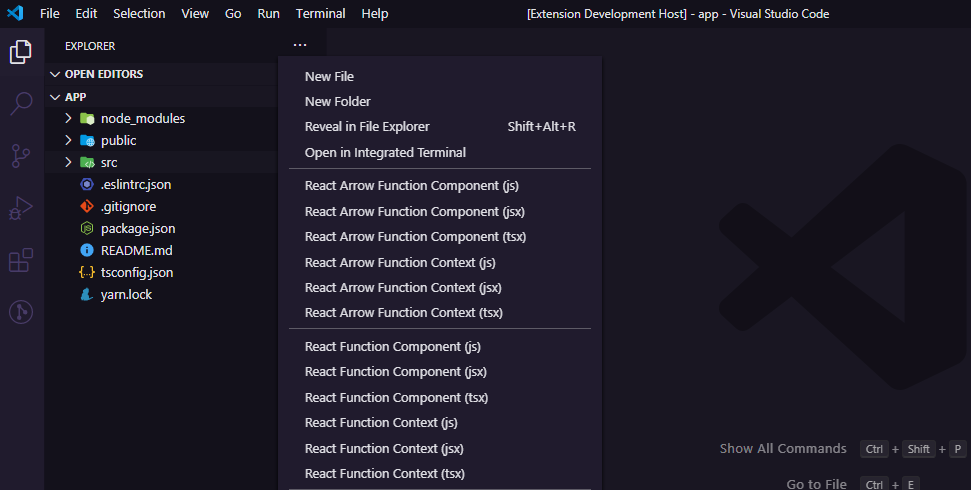
In the Context Menu choose:
React Function Component (js)React Function Component (jsx)React Function Component (tsx)React Function Context (js)React Function Context (jsx)React Function Context (tsx)React Stateless Function Component (js)React Stateless Function Component (jsx)React Stateless Function Component (tsx)React Stateless Function Context (js)React Stateless Function Context (jsx)React Stateless Function Context (tsx)
- Where a component is created in the components folder.
- Where a context api is created in the contexts folder.

In the box provided, type the name of the component, which may vary as follows:
-
A simple name, example: counter
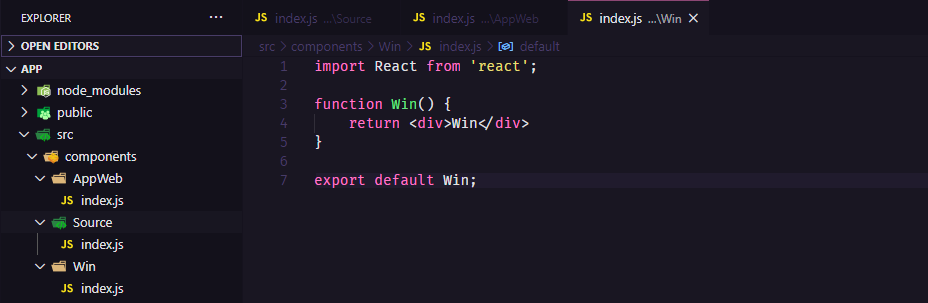
A component or context is created respectively, the name entered is the folder and within that folder an
index.js|jsx|tsx. -
Several names separated by commas, example: counter, header, footer
A component or context is created respectively, the names entered are separated into folders and within each folder an
index.js|jsx|tsx. -
Names separated by periods are compound words, example:
app.web,header.counter, etc.If the name (s) are a period separating it means that your initials will be in uppercase, example:
AppWeb,HeaderCounterand the others name follows the same PascalCase nomenclature, exemplo:Counter,App, etc. -
Name with numeric initials will not be accepted Example names: 1Header, 2Web are not accepted