Finds CSS that does nothing on the page. It checks with a real Chromium browser through the Chrome DevTools Protocol (CDP).



You need a Chromium browser — Chrome, Edge, or Chromium. NoEffect finds it by itself, or you can set
noEffect.chromiumPath. All work happens on your computer. Nothing is sent out.
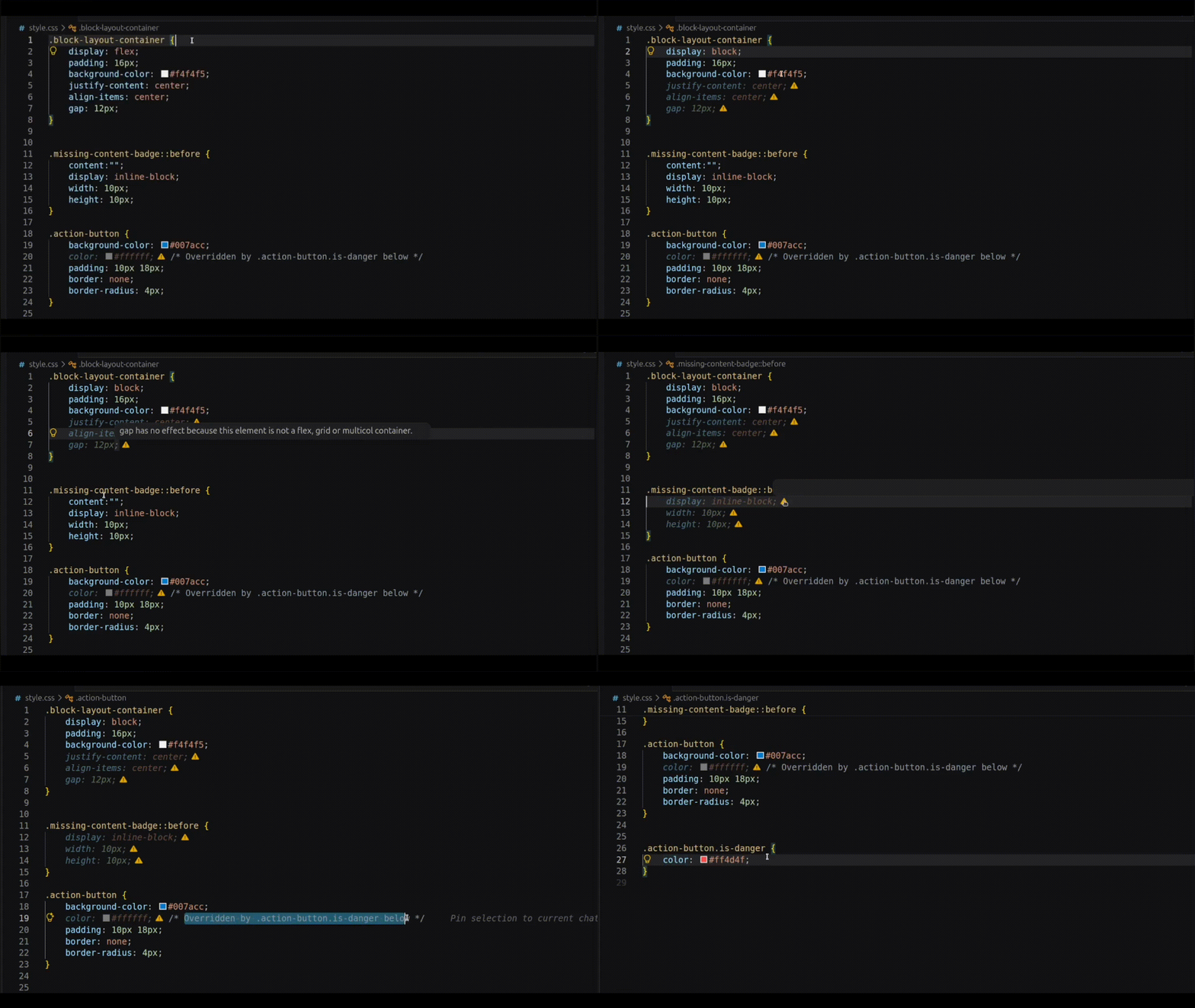
Dead CSS looks dim with a small icon. Hover the icon to see why (DevTools-style tooltip).
- Real browser check. A real browser checks every rule — matched styles, layout, pseudo-elements. No guessing about the cascade.
- Works where CSS lives. Stylesheets,
<style>blocks, and inlinestyle="". No HTML file next to the CSS? NoEffect finds companion pages in the project and checks up tonoEffect.maxCompanionsof them. - Only dims dead CSS. A rule is dimmed only when no checked page uses it — one page where it works keeps it alive.
- Simple DevTools look. Dim text plus a warning icon, a hover tooltip with the reason, and a jump to the winning rule for overridden duplicates.
- Fast. Caches and one reused browser session keep the second check in milliseconds (~10–40 ms). One bundled dependency — nothing is downloaded at install.
CSS/HTML file → read CSS → find companion pages → open in Chromium over CDP
  → check each selector in the real page → dim dead CSS + icon + tooltip
Each rule is checked against the real page layout, using 9 rule families with clear reason codes. No hard-coded property lists.
| Requirement | Notes |
|---|---|
| Browser | Chrome, Edge, or Chromium. Found by itself, or set noEffect.chromiumPath |
| VS Code | ^1.85.0 |
| Trusted workspace | Needed — it opens a local browser |
- Install NoEffect from the VS Code Marketplace.
- Open and trust the workspace.
- Analysis runs on save (
noEffect.analyzeOnSave).
| Command | Description |
|---|---|
NoEffect: Analyze CSS Inactive Properties |
Check the current file |
NoEffect: Clear All Highlights |
Remove dim and icons |
NoEffect: Jump To Overriding Declaration |
Go to the winning rule in the cascade |
NoEffect: Show Status |
Show status and checked pages |
NoEffect: Diagnose Setup |
Check browser, workspace, and settings |
NoEffect: Restart Analysis Session |
Start a new clean browser session |
NoEffect: Clear Cache |
Delete the cache |
NoEffect: Show Output Logs |
Open the log |
| Setting | Default | Description |
|---|---|---|
noEffect.enabled |
true |
On/off switch |
noEffect.analyzeOnSave |
true |
Check when you save a CSS/HTML file |
noEffect.analyzeOnType |
false |
Check while you type, after a short wait (not stable yet; needs saved files) |
noEffect.debounceMs |
1500 |
Wait time before analyze-on-type runs |
noEffect.highlightStyle |
"both" |
"both", "iconOnly", or "dimOnly" |
noEffect.chromiumPath |
"" |
Path to the browser file. Empty = find it by itself |
noEffect.ignoredFiles |
[] |
Files to skip (glob patterns). Always skips node_modules, dist, minified CSS, … |
noEffect.maxFileSizeKb |
512 |
Skip files bigger than this |
Companion search (advanced):
| Setting | Default | Description |
|---|---|---|
noEffect.companionSearchDepth |
6 |
How many folders deep to look for HTML files |
noEffect.companionMaxCandidates |
500 |
Max files to look at in one search |
noEffect.maxCompanions |
3 |
Max HTML pages checked per CSS file |
- Saved files only. It only reads saved files. If the file is not saved, you see
FILE_UNSAVED. Analyze-on-type is off by default and not stable yet. - Only some HTML files. NoEffect checks up to 3 HTML files per CSS file (
noEffect.maxCompanions), plus a few more on match. With no HTML file, it uses a fake page. Some checks for tags, parents, and overrides do not work there. On a real page, it checks only the first match. Other matches can be different. - Only some selectors. It works with classes, IDs, tags,
A BandA > B, and::before,::after,::first-letter. It skips:hover,:focus,[type="..."],+,~, and*alone. - Only screen width in px. It checks
@mediawidth rules inpxwith up to 7 screen sizes. Other@mediarules (orientation,prefers-*, height, units likeem) only hide the warnings they could change: a warning is hidden only if an unrecognized rule sets the same property (or a layout property, for layout warnings). Unrelated warnings still show.@containeralways hides warnings because container size is never checked. - Only local CSS and HTML. It works with
.cssand.htmlfiles, with<style>andstyle="". No Sass/Less, no CSS-in-JS, no.vue/.svelte/.jsx. Remotehttps:files and@importare not read (but they still change the page). Shadow DOM and iframes are skipped. It also skips.min.css/.bundle.cssfiles, files over 512 KB, andnode_modules/distfolders. - Only known rules. If there is no rule for a property (flex, grid, position, and others), NoEffect says nothing.
var()names are shown as-is in tooltips. - Needs Chrome and a trusted folder. You need Chrome, Edge, Brave, or Chromium (
noEffect.chromiumPath). No browser inside (~290 KB). It does not work in untrusted folders or in the browser version of VS Code (vscode.dev).
If you find a problem, open an issue with a small example. Help is welcome!
Bugs, ideas, and discussion: GitHub Issues · Repository
Licensed under the PolyForm Noncommercial License 1.0.0 — free for personal, educational, and non-commercial open-source use; commercial use requires a separate license.
Development:
npm install
npm run compile            # check types (tsc)
npm run lint               # eslint
npm test                   # unit tests
npm run test:integration   # tests with a real Chromium
npm run test:smoke:all     # full test in VS Code 1.85.0 + latest
Code map:
- Rules:
src/inactive/rules/(one folder per family:flex,grid,position, …) - Rule list:
src/inactive/ruleRegistry.ts(registerDefaultRules) - Reason codes:
src/inactive/reasonCode.ts - Page facts:
src/engine/layoutContext.ts(LayoutContext)
Add a rule for a new property:
- Copy a small rule, for example
src/inactive/rules/flow/clear.ts. - Write
inspect(layout, …): return a result when the property is dead,undefinedwhen not sure. Never guess. Readlayoutonly — no browser calls. - Add it to
registerDefaultRules, add a test next tosrc/test/unit/*Rules.test.ts, and runnpm test.