-
Notifications
You must be signed in to change notification settings - Fork 38
Releases #428
New issue
Have a question about this project? Sign up for a free GitHub account to open an issue and contact its maintainers and the community.
By clicking “Sign up for GitHub”, you agree to our terms of service and privacy statement. We’ll occasionally send you account related emails.
Already on GitHub? Sign in to your account
Merged
+133
−0
Merged
Releases #428
Changes from 1 commit
Commits
Show all changes
3 commits
Select commit
Hold shift + click to select a range
File filter
Filter by extension
Conversations
Failed to load comments.
Loading
Jump to
Jump to file
Failed to load files.
Loading
Diff view
Diff view
There are no files selected for viewing
This file contains hidden or bidirectional Unicode text that may be interpreted or compiled differently than what appears below. To review, open the file in an editor that reveals hidden Unicode characters.
Learn more about bidirectional Unicode characters
This file contains hidden or bidirectional Unicode text that may be interpreted or compiled differently than what appears below. To review, open the file in an editor that reveals hidden Unicode characters.
Learn more about bidirectional Unicode characters
| Original file line number | Diff line number | Diff line change |
|---|---|---|
| @@ -0,0 +1,129 @@ | ||
| --- | ||
| title: Releases | ||
| description: Group work items under named versions, track delivery progress, and publish changelogs to keep your team aligned on what ships and when. | ||
| --- | ||
|
|
||
| # Releases <Badge type="tip" text="Business" /> | ||
|
|
||
| Releases give your workspace a dedicated space to group work items under a named version, monitor delivery progress, and publish a changelog. Whether you're shipping a minor patch or a major feature launch, Releases keep your team aligned on what's going in and how much is done. | ||
|
|
||
| ## How Releases work | ||
|
|
||
| A release is a named version that pulls together work items from any project in your workspace. As those work items move through their states, the release tracks progress automatically. When you're ready to ship, the release becomes the place to publish a changelog for the rest of the team. | ||
|
|
||
| Releases live at the workspace level. This means a single release can span multiple projects — useful when a feature launch involves work across multiple projects. | ||
|
|
||
|  | ||
|
|
||
| ## Activate Releases | ||
|
|
||
| > **Role**: Workspace Admin | ||
|
|
||
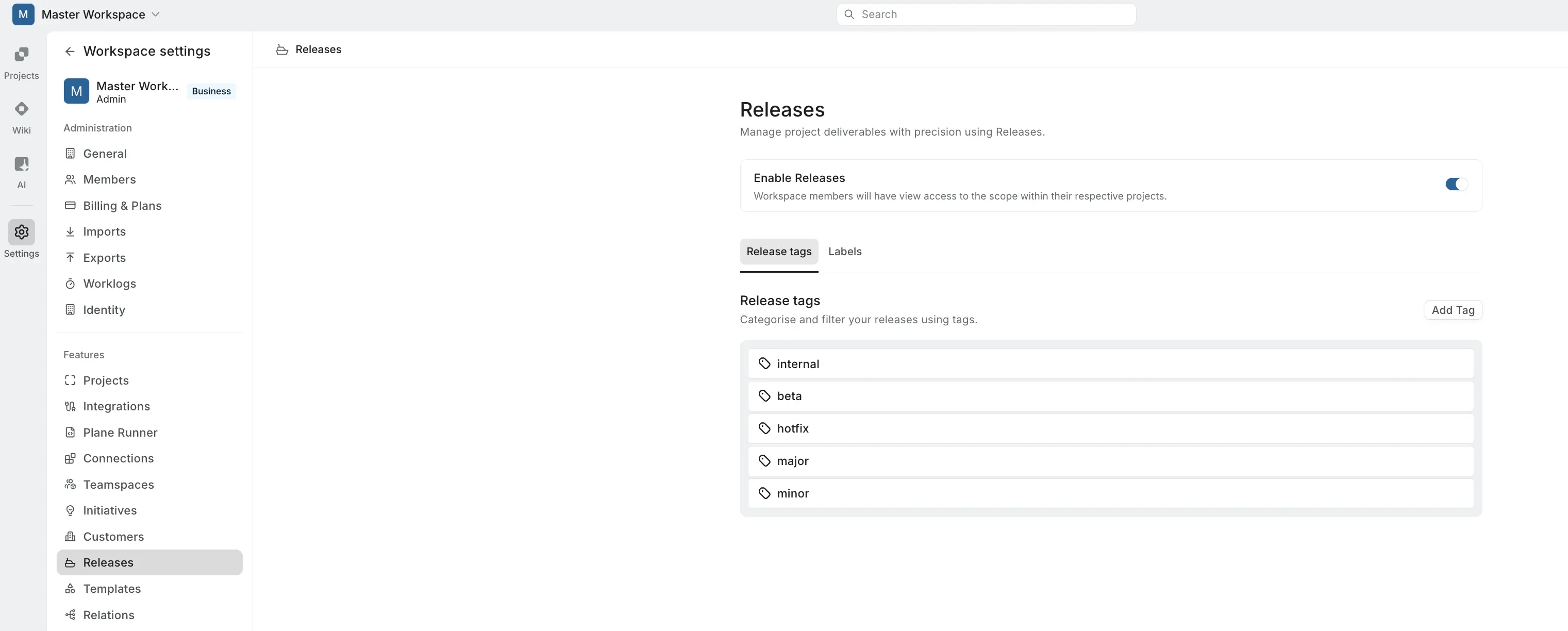
| 1. Go to **Workspace Settings > Releases**. | ||
| 2. Toggle on **Enable Releases**. | ||
|
|
||
| Once enabled, **Releases** appears in the workspace sidebar for all members. Disabling the toggle hides the section but preserves all existing data — re-enabling restores everything. | ||
|
|
||
| ## Set up tags and labels | ||
|
|
||
| > **Role**: Workspace Admin | ||
|
|
||
| Before your team starts creating releases, set up tags and labels to keep things organized. Both are managed from **Workspace Settings > Releases** and available across the workspace when creating or editing a release. | ||
|
|
||
| ### Release tags | ||
|
|
||
| Tags categorize releases across your workspace — useful for filtering by type, environment, or team. Switch to the **Release tags** tab and click **Add Tag** to create one. | ||
|
|
||
| ### Labels | ||
|
|
||
| Labels organize releases visually with a name and color. These are separate from the project-level work item labels. Switch to the **Labels** tab and click **Add Label** to create one. | ||
|
|
||
| ## Create a release | ||
|
|
||
|  | ||
|
|
||
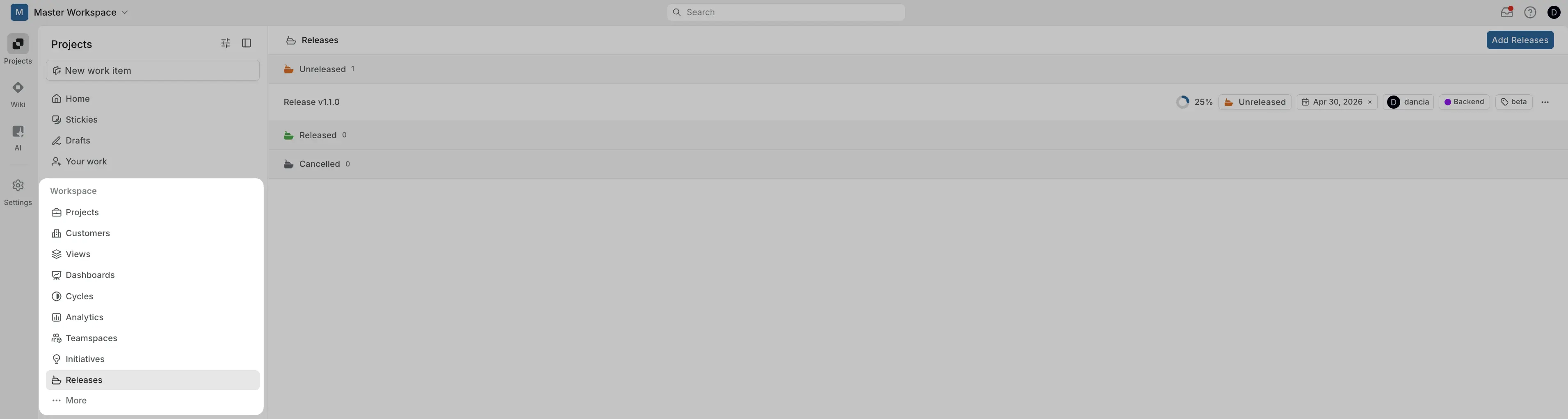
| 1. Click **Releases** in the workspace sidebar. | ||
| 2. Click **Add Release**. | ||
| 3. Fill in the release details: | ||
|
|
||
| | Field | Description | | ||
| | --- | --- | | ||
| | **Title** | Required. A short name for the release — for example, "v2.4 — Dashboard refresh." | | ||
| | **Description** | Goals, notes, or relevant links. | | ||
| | **Status** | Unreleased (default), Released, or Cancelled. | | ||
| | **Tag** | One or more tags from workspace settings. | | ||
| | **Labels** | One or more labels from workspace settings. | | ||
| | **Target date** | Planned ship date. | | ||
| | **Lead** | Responsible owner, selected from workspace members. | | ||
|
|
||
| 4. Click **Create Release**. | ||
|
|
||
| You'll land on the release detail page, where you can start adding scope and writing the changelog. | ||
|
|
||
| ## Work with a release | ||
|
|
||
| Each release has three tabs: **Overview**, **Scope**, and **Changelog**. | ||
|
|
||
| ### Overview | ||
|
|
||
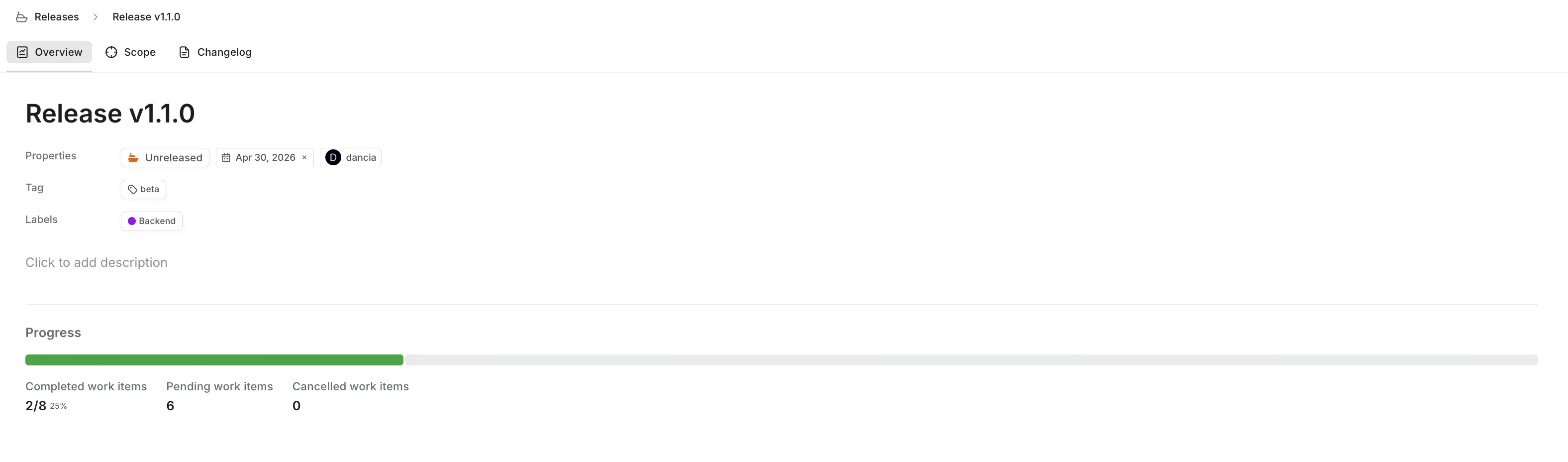
| The Overview tab shows the release description, all selected properties, and a live progress tracker. | ||
|
|
||
| The progress bar fills proportionally as work items in the release are completed. Counters display completed work items (e.g., 18/22 — 82%), pending work items, and cancelled work items. | ||
|
|
||
| Click any property chip — Tag, Label, Lead, or Target date — to edit it inline. Click **Click to add description** to write or update the release description. | ||
|
|
||
|  | ||
|
|
||
| #### Release status | ||
|
|
||
| A release moves through three statuses that reflect where it is in its lifecycle: | ||
|
|
||
| - **Unreleased** — the default status when a release is created. Work is still in progress, and the scope and changelog are being built out. | ||
| - **Released** — the release has shipped. Use this to mark the release as complete and signal to your team that it's out. | ||
| - **Cancelled** — the release was abandoned. Use this when a planned release is no longer going forward, so the scope and history are preserved without cluttering your active releases. | ||
|
|
||
| Click the status chip on the Overview tab to change it. The Releases list groups releases by their status, so updating this keeps your list organized and makes it easy to see what's active, shipped, or cancelled. | ||
|
|
||
| ### Scope | ||
|
|
||
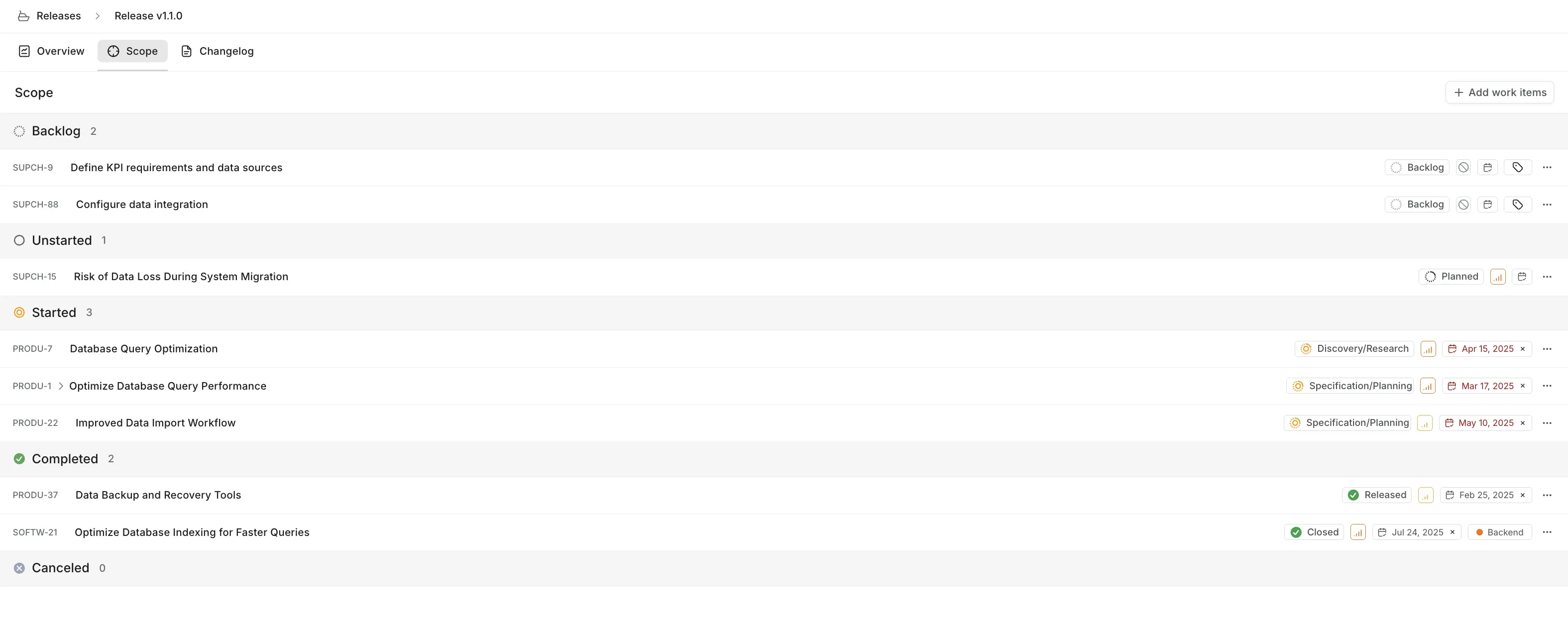
| The Scope tab lists all work items attached to the release, categorized by [state group](/core-concepts/issues/states#state-groups). This is the source of truth for what's in the release. | ||
|
|
||
| Click **Add work items** to search and attach items by title or ID. Work items from any project in the workspace can be scoped to a release. To remove an item, hover over it and click the remove icon. | ||
|
|
||
| A work item's existing state drives the progress calculation automatically — you don't need to mark anything as "done in release" separately. | ||
|
|
||
|  | ||
|
|
||
| ### Changelog | ||
|
|
||
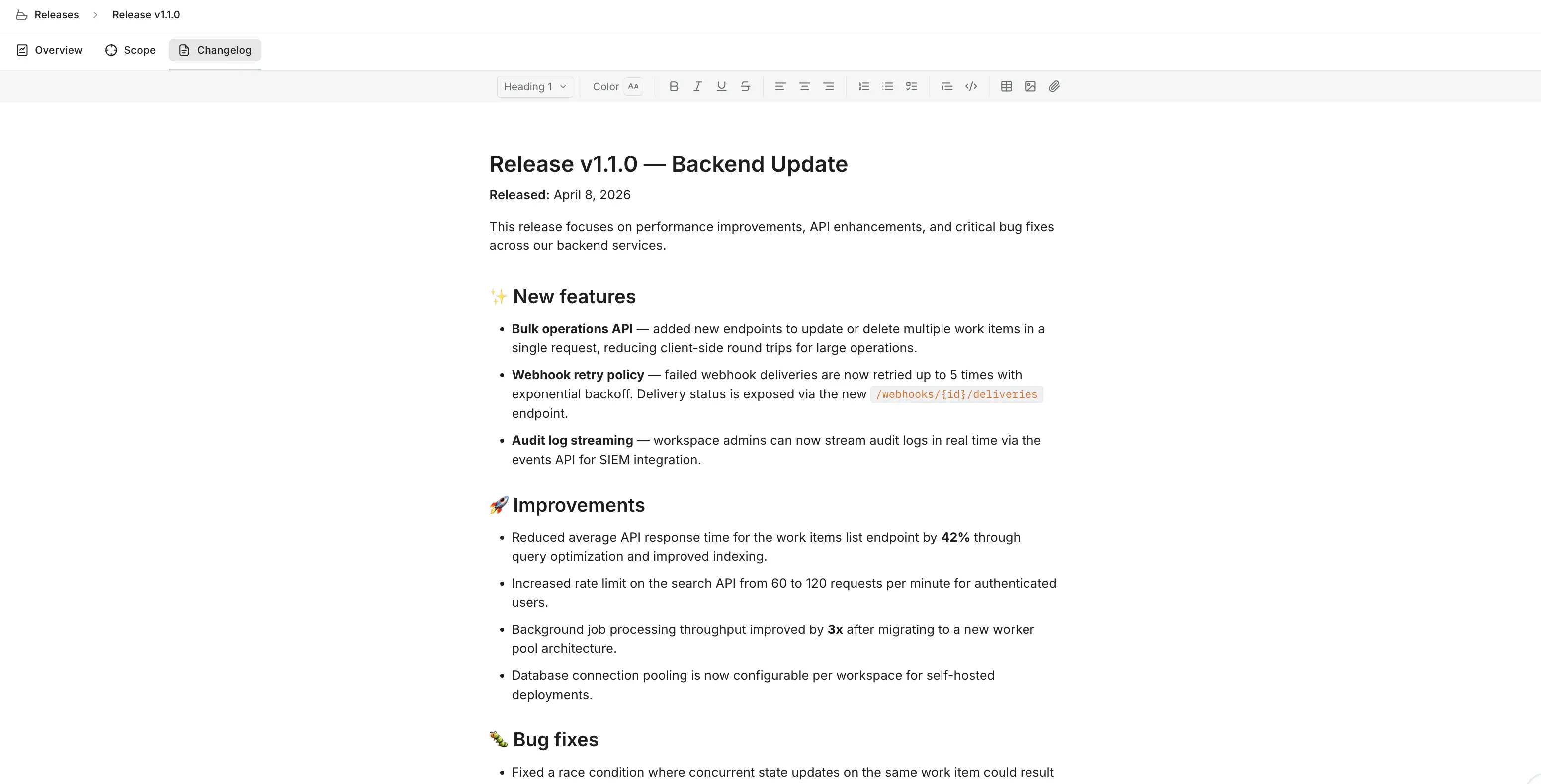
| The Changelog tab provides a rich text editor where you write and publish a summary of what changed in the release. | ||
|
|
||
| The editor supports . Changes save automatically as you type. The changelog is visible to all workspace members who can access the release. | ||
|
|
||
|  | ||
|
|
||
| :::tip | ||
| Use the Scope tab to audit completed work items, then use the Changelog tab to write polished, user-facing notes based on that list. | ||
| ::: | ||
|
|
||
| ## Tag work items with a Release property | ||
|
|
||
| Plane supports **Release picker** as a custom property type on work items. This makes the release a first-class attribute on any work item, so members can assign work to a release without navigating to the Scope tab. | ||
|
|
||
| ### Add the Release property | ||
|
|
||
| > **Role**: Project Admin | ||
|
|
||
| To add the Release property to a work item type: | ||
|
|
||
| 1. Go to **Project Settings > Work item Types**. | ||
| 2. Select the work item type you want to extend. | ||
| 3. Add a custom property of type **Release**. | ||
|
|
||
| Once added, the **Release picker** field appears in the work item detail view. Any project member can set which release a work item belongs to directly from there, and the work item will automatically appear in that release's Scope tab. | ||
|
coderabbitai[bot] marked this conversation as resolved.
Outdated
|
||
|
|
||
| With release as a work item attribute, you can group, filter, and build dashboard views around release milestones, giving leadership visibility into delivery velocity per release. | ||
|
|
||
| :::tip | ||
| When importing from Jira, Fix Version and Affects Version fields map cleanly to the Release property. Your release tagging data carries over without manual re-tagging. | ||
| ::: | ||
Oops, something went wrong.
Add this suggestion to a batch that can be applied as a single commit.
This suggestion is invalid because no changes were made to the code.
Suggestions cannot be applied while the pull request is closed.
Suggestions cannot be applied while viewing a subset of changes.
Only one suggestion per line can be applied in a batch.
Add this suggestion to a batch that can be applied as a single commit.
Applying suggestions on deleted lines is not supported.
You must change the existing code in this line in order to create a valid suggestion.
Outdated suggestions cannot be applied.
This suggestion has been applied or marked resolved.
Suggestions cannot be applied from pending reviews.
Suggestions cannot be applied on multi-line comments.
Suggestions cannot be applied while the pull request is queued to merge.
Suggestion cannot be applied right now. Please check back later.
Uh oh!
There was an error while loading. Please reload this page.